
Malware and ransomware attacks continue going up. In 2020, ransomware attacks increased 485%, and during the first half of 2021, they’ve risen another 151%.
Cyberattacks have become one of the biggest risks to an organization. Falling victim to one can mean hundreds of thousands of dollars in remediation costs. This makes IT security defenses a high priority, and layered plans that include multiple tactics offer the best protection.
One of the vital layers in any cybersecurity strategy, along with software-related safeguards, is your employee security awareness training.
Your team is on the front line of attacks because a vast majority of those attacks come via phishing emails. These emails are directly targeted to your users and attempt to fool them in sophisticated ways.
Today’s scam emails are very difficult to tell from the real thing, thus skills need to be honed to make phishing identification second nature.
Did you know? Having employees that are well trained in cybersecurity awareness can reduce a company’s risk by up to 70%.
The following tips will help your team identify scams, avoid clicking harmful links, and prevent major IT security breaches.
Hover Over Links Without Clicking
One of the quickest ways to spot a phishing email is to hover over any links. Links are now used more often than file attachments in malicious emails because they have an easier time making it past certain antivirus software.
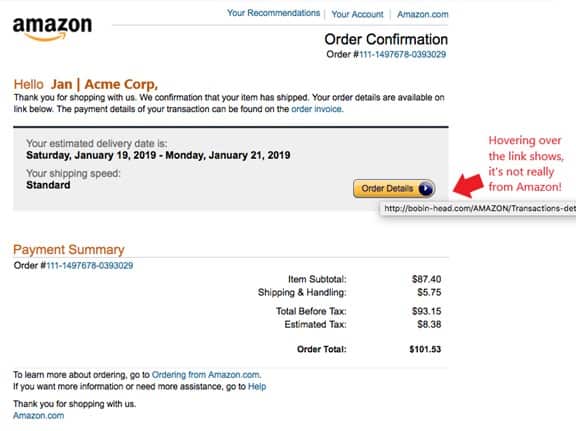
Links can be hidden behind text that looks like the right link or images like buttons. Hovering over these will display a popup of the true URL. If it looks “off” then it is likely a scam email.
This example, below, does a convincing job of spoofing the look of an Amazon.com order confirmation email. It even includes personalization at the top. But when hovering over the link, it’s obviously a phishing scam.
Look for Typos and Grammatical Errors
Typos and grammatical errors are not as easy to spot in phishing emails today as they used to be. But even though scammers have become more sophisticated and are using AI to generate realistic-looking scam emails, these scammers do slip up every now and then.
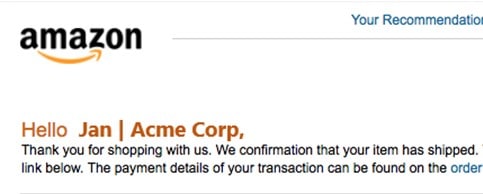
For example, taking a closer look at the email above that spoofs Amazon, at first glance, you may not have noticed this grammatical error (which Amazon itself most likely would not make).
The second sentence of the email says, “We confirmation that your item has shipped.” This is incorrect, and should be “We confirm that your item has shipped.” It’s an easy-to-miss mistake, but it’s another giveaway that this email isn’t real.
Look for Copycat Domains
Copycat domains are those that look like they should be legitimate, and they can easily fool someone that isn’t well trained into believing the email is for real. Scammers will use domains that are spelled almost like the real thing, hoping users will miss the mistake. Such as Nationalfondation.com (leaving out the “u” in foundation.)
Or they will use the real URL within their fake email address, such as “postalservice@encom.postalservice.com.”
Use SLAM to Remember What to Look for
SLAM is an acronym to help you remember all the different areas of an email that you should check. These include:
- Sender (is the email from someone you know? Is the “from” address legitimate?)
- Links (hover over all links)
- Attachments (scan attachments for malware before opening and never open if it’s from someone you don’t know)
- Message (carefully check the message body for grammar and spelling errors)
Research Unsolicited Emails Online (Even if They’re From a Vendor You Know)
Many phishing emails are very hard to spot. They don’t make any grammatical errors, use graphics that look just like the real thing, and may cleverly spoof the domain address.
If you are unsure if an unsolicited email is legitimate and can’t see any obvious signs of phishing, do a quick Google search of the sender’s email address. This can often bring up scam notices.
In the case of this scam that purports to be from Bank of America, the email is very convincing and uses an email address that looks like it might be the real thing, “bankofamerica@emcom.bankofamerica.com.”
However, searching for that address on Google quickly brings up multiple scam warnings.
Conduct Ongoing Training & Phishing Drills for Employees
It’s vital to conduct ongoing IT security training for your team, including phishing drills that help them hone their skills in real-time on fake phishing emails that are designed to look just like the real thing.
The KnowB4 training service that Twin State Technical provides includes ongoing training, phishing drills, and reporting that lets you see how your team is improving on their phishing identification.
Decrease Your Risk of a Cyberattack with Training Services & Cybersecurity Solutions from Twin State Technical Services!
Training your team doesn’t need to be a hassle. Working with Twin State Technical Services Cybersecurity Architects ensures your Quad Cities area business has the tools it needs for a team with well-honed phishing detection skills.
Contact us today for a cybersecurity audit or consultation. Call 563-441-1504 or contact us online.
References linked to:
https://www.infosecurity-magazine.com/news/ransomware-attacks-grow-2020
https://www.tsts.com/layered-security-services/
https://www.tsts.com/2021-cybersecurity-awareness-month-a-message-from-our-ceo/
https://blog.knowbe4.com/train-employees-and-cut-cyber-risks-up-to-70-percent


