Synchronize Outlook with your personal Gmail or iPhone calendar
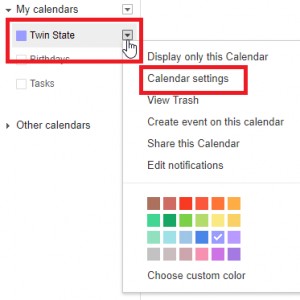
Want to know how to see your personal Gmail or iPhone calendar in your work outlook? Follow these easy steps so you never miss an important personal event in the new year. How to Subscribe to your Google Calendar An Internet Calendar (iCal) Subscription keeps your Outlook copy of your Google Calendar up-to-date. 1. Log into your Google Calendar account (https://www.google.com/calendar) 2. In the left column, click My calendars to expand it, click the arrow button next to the calendar that you want to add to Outlook as an Internet Calendar Subscription, and then select Calendar settings. **If you cannot see these settings, you are on the new calendar view. To go back to classic Calendar view click the Settings menu, which is the gear in